
Oxford Drum Gate 2 v1.02.0 – The Align Tab, Rebuilt
Mixing drums means working through bleed from neighbouring mics, phase relationships that sap punch and clarity, and manual nudging that eats up session time before you've made a creative decision. Oxford Drum Gate 2 was built to change that. v1.02.0 overhauls one of the plugin's most powerful feature: the Align tab.
Why Alignment Matters
Even with the cleanest recordings, a multi-mic'd drum kit can be a phase nightmare – the kick bleeds into the snare bottom and the overheads hear everything – and don't get us started on toms. Engineers have spent decades manually nudging tracks, flipping polarity, and guessing at phase rotation.
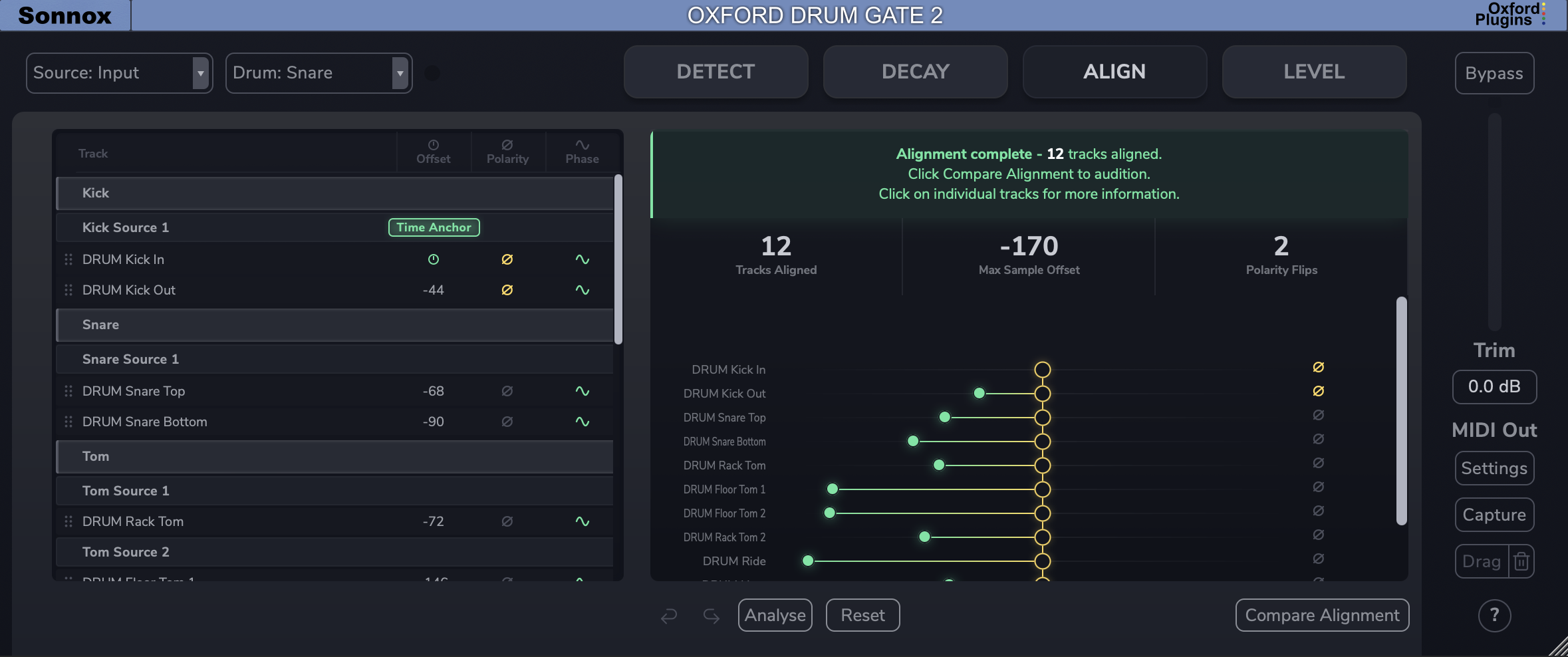
With the Align tab in Drum Gate 2, we wanted to eliminate this pain point in drum mixing. Put an instance on each of your drum tracks, hit Analyse, and voila - you have time and phase-aligned drums. It reads your track labels to group your mics, then adjusts timing, flips polarity, and rotates phase across the spectrum on every track to optimise the kit. As producer George Lever put it in our recent walkthrough, the Align feature brings a "heft" to the drum kit that even heavy EQ and a lot of session time couldn't replicate – without spectral phase rotation, it wouldn't be possible at all.
What's New in v1.02.0
Full Drag-and-Drop Track Organisation
The updated Align tab now lets you drag and drop tracks between groups and subgroups – kick, snare, toms, cymbals, overheads, rooms and so on. If you're working with a kit that has two kick drums, two snares, or any combination of shells, you can organise your mics the way the session demands. The plugin no longer assumes a one-size-fits-all kit layout.
Choose Your Own Time Anchor and Phase Reference
Previously, Drum Gate 2 would automatically assign the kick as the time anchor – the track everything else aligns to. That's a sensible default, but not always the right call. Now the choice is yours. We recommend a steady, transient-heavy track like the kick or snare as your time anchor, but if your session calls for something different, you're in control.
The phase reference – the track against which all phase correlation changes are tested – is equally configurable. For most kits, the overheads make the most sense here, since they capture most of the kit's overall picture. Again, the plugin gives you the flexibility to make that judgement yourself.
A Setup Wizard That Teaches as You Go
One of the philosophies behind our tools at Sonnox is that plugins should help you grow as a mixer, not just do the work for you. The setup wizard walks you through each stage of the alignment process, explains what Drum Gate 2 is listening for, and shows you what changes it made and why. No black box. The reasoning is on screen.
Deeper Per-Track Feedback
Click any track to see the full breakdown of what was applied – time offset, polarity, and phase rotation by frequency band. The bands aren't arbitrary. Three narrow ones in the low end, centred on kick, tom, and snare fundamentals – where phase problems hollow out the snare and weaken the kick. Wider bands further up, where the symptom is comb filtering on the overheads. The actual filter is more complex, but a display showing rotations beyond 180° wouldn't help anyone make a decision or hear the change.
Quality-of-life improvements
Missing audio is flagged before analysis runs, there's full undo and redo on the Align tab. and a stack of other refinements you'll notice without us having to point at them.
Why this update
The v1.02.0 update to the Align tab reflects how we build tools at Sonnox. Drum alignment has long been one of those opaque skillsets that separates experienced engineers from everyone else. Drum Gate 2 makes the work fast and the reasoning visible.
Already using Drum Gate 2?
Ready to Try Oxford Drum Gate 2?
Check your upgrade eligibility.
- Purchased before September 1st 2025: upgrade for 66% off.
- Purchased on or after September 1st 2025: free upgrade.
You should have received your personalised upgrade offer via email. If you haven't, you can check your eligibility below.
New to Drum Gate?
Start with a fully functional 15-day free trial. No restrictions. Use it in your own sessions and hear the difference on real mixes.